
Static site search: when the browser is enough
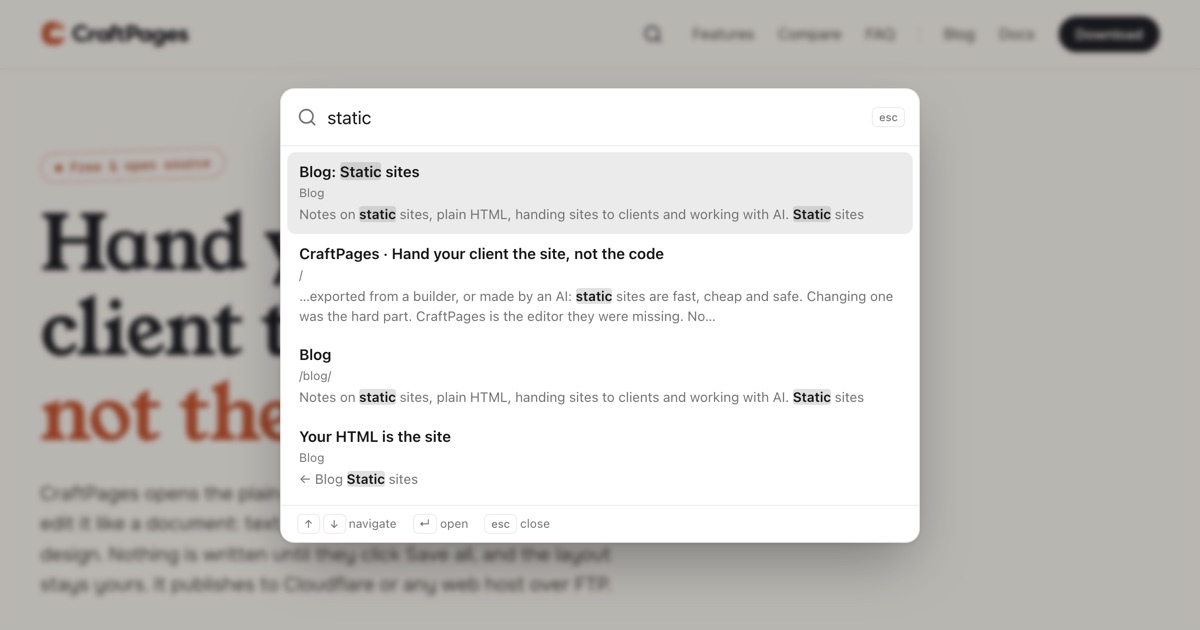
Static site search sounds like it needs a server. It usually doesn't. You build an index of your pages when the site is built, ship it as one more file, and let the visitor's browser search it. No backend, no API key, nothing to keep running.
The question is how long that holds up. A ten-page brochure site is easy. A blog with a thousand posts, or a documentation portal, is where people start to wonder whether the index itself becomes the problem. It does, eventually. But later than you'd think, and for reasons you can measure.
How client-side search works
There are three parts, and none of them run on a server:
- An index file. When you save or build the site, a script reads every page and writes its searchable text to a JSON file: titles, headings, body text, a description.
- A small script on every page. It waits until the visitor opens search, then downloads the index once.
- Matching in the browser. Each keystroke is checked against the index in memory, and the results show up as you type.
Lunr, Fuse.js and FlexSearch are libraries for the third part. Pagefind does all three and splits the index into chunks. CraftPages has its own version built in: you add a search icon to your pages, and the index is rebuilt on every save, blog publish and deploy.
The trade-off is simple. You get search with zero infrastructure. In return, every visitor who searches downloads the index and searches it on their own device.
When static site search starts to slow down
Two costs grow with the site: the download (the index gets bigger with every page) and the work the browser does to search it. We measured both with the CraftPages search script, using pages of about 1,300 words each, a normal blog post:
| Pages | Index download (compressed) | First search, getting ready | Each keystroke |
|---|---|---|---|
| 100 | 0.2 MB | under 5 ms | about 3 ms |
| 500 | 1.1 MB | under 5 ms | about 13 ms |
| 1,000 | 2.2 MB | about 5 ms | about 20 ms |
| 2,500 | 5.4 MB | about 25 ms | about 50 ms |
| 5,000 | 10.8 MB | about 40 ms | about 100 ms |
We measured this on 9 October 2026 with the search script that ships with CraftPages, in Node on an Apple Silicon laptop, on generated pages. "Getting ready" is the one-time work after the download; "each keystroke" is the time to find and rank results. A mid-range phone is several times slower, and its connection may be too.
Two things stand out. Speed holds up well: even at a few thousand pages, typing feels instant on a laptop. The download is what gives out first. Up to a few hundred pages, the index is smaller than a typical hero image. At a thousand long pages it's a couple of megabytes, which is fine on Wi-Fi and slow on a train.
So the practical answer to "when is client-side search enough?":
- Up to a few hundred pages: a single index file is fine. Don't overthink it.
- Around a thousand pages: still works, but keep the index lean (more on that below) and watch its size.
- Several thousand pages and up: split the index so visitors only download the parts their query needs.
- Tens of thousands of documents, or you need analytics on what people search for: that's when a hosted search service or your own search server earns its cost.
A smaller index beats a faster server
Most indexes are bigger than they need to be, because they index everything on the page. Much of a page isn't content: the "← Back to blog" link, the author byline, the date, the tag badges, "Read more →" on every card, page 2 of the archive. Each of those is noise in the results and weight in the download.
On a blog it's worse. The list page shows every post's title and excerpt, and so does every tag page and every page of pagination. Index them all and a search for one post can return six results, five of them archive pages that only repeat it.
This is what the CraftPages index leaves out, so it doesn't have to be cleaned up by hand:
- Blog posts are indexed by their article. The text between the title and the end of the post, not the back link, byline, date, tags or call to action around it.
- Post cards aren't indexed again. The list page keeps its own intro, and the posts are found through their own pages.
- A tag page is one result, by its name. Search "static sites" and you get the archive for that tag, not every post on it repeated.
- Pagination is skipped. Page 2, 3 and onwards only repeat posts that are already in the index.
- Repeated links are skipped. A link with the same text on many pages ("Contact us", "Download") is navigation, not content. Arrows like "← Home" and "Older posts →" are skipped too.
- Navigation, headers and footers are skipped, and so are scripts, forms and anything hidden.
What stays matters just as much: the short texts on a landing page that describe each feature, the questions on an FAQ, the headings that split a long page. Those are what people search for, and they're kept. When a heading has an id, the result links straight to it.
You can steer it yourself, too. A page can leave search entirely with a meta tag, and any block can be skipped with the data-craftpages-search-ignore attribute. If the index grows past a megabyte, the app says so and shows where to leave pages out.
When to split the index
Past a few thousand pages, no amount of trimming makes one file small enough. The next step is still not a server. It's splitting the index.
The idea: instead of one file with every page, the build writes many small files, grouped by the words they contain. A search for "invoice" fetches only the chunk that covers "invoice". The visitor downloads tens of kilobytes instead of megabytes, however large the site gets. Pagefind is the best-known tool that works this way, and it was built for large sites on plain static hosting.
Splitting has its own costs: more files to deploy, a network request per new word typed, and a little lag the first time. For most sites it's not worth it. For a large docs portal it is.
When a server is worth it
A dedicated search backend (a hosted service or one you run) makes sense when you need things a static file can't give you:
- Very large or fast-changing content, where rebuilding and redeploying the index on every change is too slow.
- Search analytics: which queries return nothing, what people look for most.
- Ranking you control per query, synonyms, typo handling across many languages, or results personalized per user.
- Private content, where the index can't be a public file because it would reveal pages not everyone should see.
If none of those apply, a server is a monthly bill and a dependency that buys you very little over a well-built index file.
Questions
Is client-side search bad for SEO? No. Search engines index your pages, not your search box. The index file is just another static file, and it doesn't affect how your pages rank.
Does the index reveal pages I didn't publish? It shouldn't, and in CraftPages it doesn't: the index is built only from pages that get published, and pages marked noindex are left out.
How big is too big for an index file? As a rule of thumb, keep the compressed download under about one megabyte. Past that, trim what you index, then consider splitting.
Do I need a search server for a blog? Almost never. A blog with a few hundred posts is comfortably inside what one index file handles, especially once the post cards, tag pages and pagination stop being indexed twice.
Try it
Static site search in CraftPages takes a minute to add: choose where the icon goes, and the index builds itself from your pages. It works on any static host, with the keyboard (⌘K, Ctrl+K or "/") and with screen readers. It's part of the editor, which keeps your HTML as the site.
CraftPages is free and open source for macOS, Windows and Linux.